

In December 2022, I described a frustrating Coinbase identity-verification experience while living in Germany. A prompt appeared to offer a way to exit, but after I began the process I encountered a screen I could not dismiss. The account below preserves that experience and the screenshots I shared at the time. It is not evidence that every Coinbase customer encounters the same problem today.
If you are currently stuck, use Coinbase’s current help pages and authenticated support route. Verification methods, supported documents and account restrictions can change. The older IDnow instructions in the original account should not be treated as a guaranteed fix for a present-day account.
Why I was concerned about access
I had been a Coinbase customer since 2020. After the collapse of FTX in November 2022, I wanted to move most of my crypto holdings away from the exchange. That was my personal response to events at the time, not a recommendation that readers make the same custody decision.
When I logged in, I saw a notification inviting me to complete verification to remove a trading limit. I understood the process as something I could leave if it did not work. Previous attempts had not gone smoothly, but I tried again because I expected the option to exit would remain available.
The difference between a trading restriction and being unable to navigate the app mattered to me. A person may accept that an account needs checks while still needing clear information about what they can access and what happens if a step fails.
What happened during the verification attempt
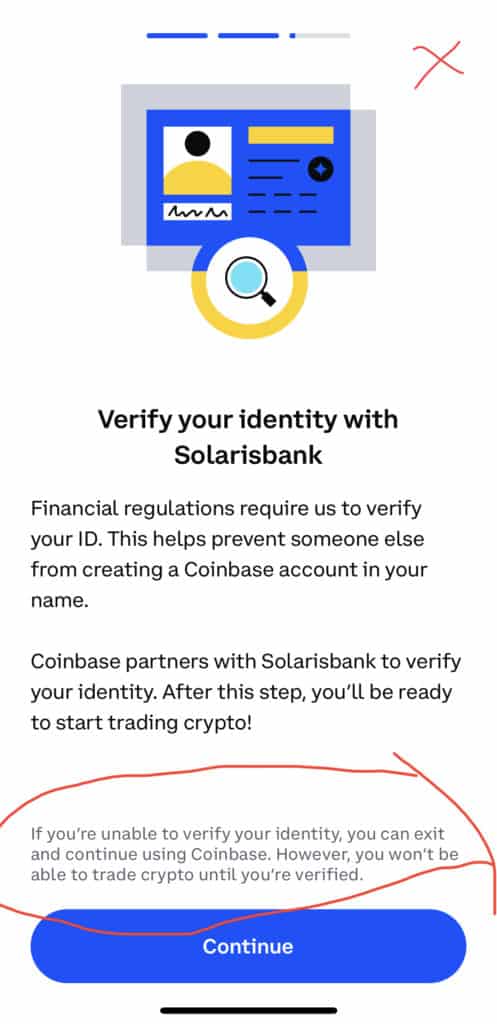
I opened the verification prompt in the Coinbase mobile app and reached the bank-verification step associated with Solarisbank. I could not obtain the IBAN needed to complete the process. Because I could not find a close button in the prompt, I closed the app.
When I reopened it, a verification screen appeared over the app again. I could not find the opt-out control I had expected from the wording and my earlier experience. From my perspective, an optional-looking invitation had become a route I could not leave without completing further checks.
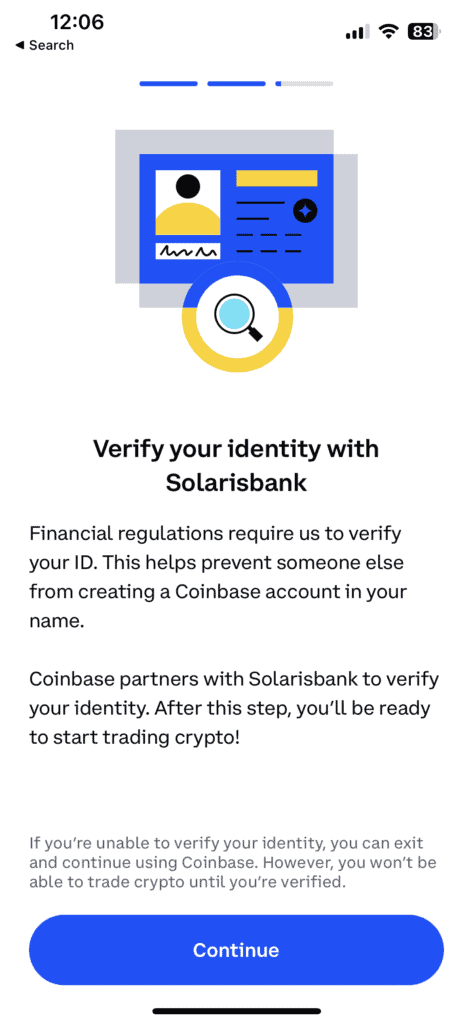
This describes what I observed and understood at the time. The screenshots show the wording that concerned me; they do not, on their own, establish the underlying technical cause or every action available on the account. Those questions would require account-specific records from the service.
Why contacting support was frustrating
I tried to obtain help through the available support routes. In the account I originally wrote, I described difficulty finding a category that matched the KYC issue and difficulty explaining the distinction between an already-verified customer and a new verification prompt.
I also described speaking with German phone support after attempts to use other phone routes. I sent screenshots showing the wording that I believed did not match what the app allowed me to do. My concern was about the experience and the lack of a clear explanation, rather than an objection to all identity checks.
The exchanges left me feeling that the specific problem was not being understood. That is a description of my interactions, not proof about the training or intentions of every support employee. Clear questions and a record of the sequence would have been more useful than speculating about motives.
What KYC means in this context
KYC stands for “know your customer.” Identity verification is one part of how financial services check who is using an account. Coinbase’s own identity-verification troubleshooting guide describes checks and common problems in its current process.
A verification request is not, by itself, an accusation that a customer has committed a crime. It also should not be assumed to mean that every account feature is available until the process finishes. For a current restriction, ask the service to identify what is affected and what action it requires.
The useful complaint in my case was specific: the wording suggested an exit, but I could not find one after starting. Clear explanations of restrictions and recovery steps matter even when a verification requirement is legitimate.
What resolved my 2022 situation
The original article reported that support directed me toward an IDnow video-verification route and that I completed verification after several days. That is historical information about this account. It does not establish that the same method is available for another customer, country or date.
Do not download an app or follow a verification link simply because an old article mentions it. Start from the service’s current website or app and follow the method presented for your account. If instructions in a support message conflict with what you see, ask for clarification through the official support route.
I moved most of my holdings away from exchanges at that time. Custody choices involve different risks and responsibilities, and my decision is not a recommendation for another person’s situation. This is an account of verification difficulties, not investment or custody advice.
Keep a useful record if you encounter a problem
Record when the issue began, the device and app or browser version, the exact message and the action immediately before it appeared. Separate what you can observe from what you suspect. “The screen returns after reopening the app” is more useful to investigate than “The company has blocked everything deliberately.”
Keep relevant screenshots privately and remove personal information before any public sharing. Do not publish identity documents, full account details or security codes. Coinbase’s current troubleshooting guidance says not to email copies of identity documents to its support team; use the verification route it specifies.
When contacting support, state the outcome you need: an explanation of the restriction, a way to complete a failed step, or clarification of contradictory wording. Include an existing case reference where appropriate so the conversation can be followed without repeatedly starting from the beginning.
Use current official routes
Begin with Coinbase Help and the support options relevant to your account and location. If support does not resolve the issue, consult its current guidance on disputes and complaints. This is a route to information, not a promise about the outcome of a complaint.
Be careful with unsolicited messages from people claiming they can recover access. Use the official service rather than contacts posted in comments or sent by strangers. A public account of frustration can attract people whose offers are unrelated to legitimate support.
Keep the criticism specific and human
Before submitting a follow-up, reread the previous answer and identify what remains unanswered. Quote only the relevant wording and explain the gap. This can help keep a long exchange focused, while preserving the distinction between a technical failure, an account requirement and a misunderstanding that needs clarification.
The lasting issue in this story is the gap between what a screen appeared to promise and what I experienced. A useful response would explain the account state, acknowledge confusing wording and give a clear next step. Criticism is stronger when it stays with those observable points.
For a broader discussion of responding to frustration without dehumanising people, see ConsciousBuzz’s activism page. Our articles on accountability beyond positive language and reflecting on anger and responsibility offer related perspectives on public complaints and personal reactions.
If your current experience differs from mine, that matters. Treat this as a dated personal account, check today’s official information and keep your own evidence precise enough for the actual problem to be addressed.